What is Localhost?
Localhost is the default hostname that points to your own computer. When you enter http://localhost in your web browser, you're not connecting to the internet — you're connecting to a server running right on your machine. The IP address for localhost is 127.0.0.1, called the loopback address.
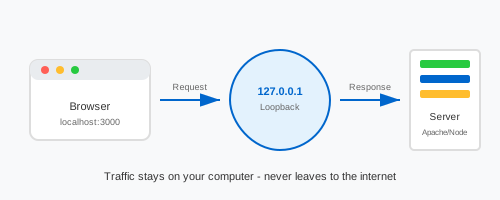
How to Access Localhost
Before you can access localhost, you need a web server running on your computer. Here's how to get started:
- Install a local server — Download XAMPP (Windows/Mac/Linux), WAMP (Windows), or MAMP (Mac)
- Start the server — Open the control panel and click "Start" next to Apache
- Open your browser — Type
http://localhostin the address bar - View your site — You should see the server's welcome page or your website files
If you're using Node.js, React, or other JavaScript frameworks, your development server typically starts on port 3000 — so you'd access it at http://localhost:3000 instead.
Common Localhost URLs
Different tools and frameworks use different ports. Here are the most common localhost addresses you'll encounter:
| URL | What It's Used For |
|---|---|
| http://localhost | Default web server (Apache, Nginx) on port 80 |
| localhost/phpmyadmin | phpMyAdmin — manage MySQL databases |
| localhost:3000 | React, Next.js, Express, Node.js apps |
| localhost:5173 | Vite — Vue, Svelte, modern React |
| localhost:4200 | Angular development server |
| localhost:8080 | Tomcat, Jenkins, or when port 80 is busy |
| localhost:8000 | Django, Python HTTP server |
Localhost Not Working? Here's How to Fix It
If localhost won't load in your browser, don't worry — it's usually an easy fix. Here are the most common problems and solutions:
1. Web server isn't running
This is the #1 reason localhost doesn't work. Open your XAMPP or WAMP control panel and make sure Apache (or your preferred server) shows "Running" status. Click "Start" if it's stopped.
2. Wrong port number
If localhost doesn't work, your server might be running on a different port. Try localhost:8080 or check your server configuration for the correct port.
3. Another program is using port 80
Skype, IIS, or other software might be blocking port 80. You can either close that program or configure Apache to use port 8080 instead.
4. Firewall blocking connections
Your firewall might be blocking local connections. Temporarily disable it to test, or add an exception for your web server.
5. Try the IP address instead
If "localhost" doesn't resolve, try http://127.0.0.1 directly. This bypasses DNS resolution and connects straight to the loopback address.
netstat -an | grep LISTEN
Why Developers Use Localhost
Localhost is essential for web development because it lets you test websites safely without affecting your live site, work offline without internet, debug faster with instant page reloads, use databases locally with MySQL or PostgreSQL, and test server-side code with PHP, Python, or Node.js.
Localhost vs 127.0.0.1 — What's the Difference?
Both localhost and 127.0.0.1 point to your computer, but they work slightly differently. Localhost is a hostname that gets resolved through your hosts file, while 127.0.0.1 is the actual IP address with no DNS lookup needed. Some programs like MySQL treat them differently for authentication. If one doesn't work, try the other. Learn more about the 127.0.0.1 loopback address.